
Realms
Overview
Realms is intended to be a fun and engaging gamification experience for stakers on the platform.
Disclaimer
By creating your realm, you agree to being vulnerable to raids from other realm owners who may attack your realm, damage your locations, and steal a small percentage of your points from a random project. You can raid other realms but raid failures also result in damage to your locations. If you anticipate that you are not going to be dedicated to protecting your realm and upgrading/raiding on a regular basis, don't feel obligated to create a realm. Abandoned realms are a prime target for looting and continual damage. Please note that all realms are susceptible to damage or theft. Your defense level just augments those odds, but no realm is impenetrable. Strategic decision-making about which realms to raid can spell the difference between success and defeat.
Creation
Any staker can establish a Realm. They just need to specify what they would like to call their Realm and hit the "Create Realm" button on the Realms webpage.
Core Project Points Starter Pack
An exclusive package of core project points is being offered to all new Realms created.
It includes the following amounts of core project points:
- 1K STAR
- 1K DREAD
- 1K SINDER
- 1K CRYPT
- 1K HYPE
- 1K CYBER
- 1K DIAMOND
Core project points are utilized to upgrade locations within your realm and this starter pack should get a new Realm owner to level 4 before running out of core project points. By then, they should have established a steady stream of CARBON that can be burned for DIAMOND and shattered into equal parts core project points. If not, they can still rely on upgrading with any points at 3x the cost.
Themes
Realms have theme options for every artist and project partnered with Skulliance. Stakers can choose a theme from their favorite project or choose a theme that best fits their personal style. The only requirement is that they hold at least 1 NFT from the project for that theme. The exception is when a Realm is newly created and assigned a random theme. If you don't hold that project, you're still allowed to keep that theme until you decide to change it. This ensures diversity amongst realm imagery by allowing the system to pull from any theme currently in the database, regardless of the staker's holdings.
Renaming
You can change the name of your Realm as you see fit. Just click on the edit icon and a field will appear where you can rename your Realm and hit the Update button to save the change.
Deactivation
You can choose to deactivate your realm at any time and no longer participate in raids. But you will have to wait a month before being allowed to reactivate your realm. This prevents abuse of the deactivate function. If you have not raided in over a month, your realm is subject to being automatically deactivated. You can reactivate an automatically deactivated realm at any time with no penalty.
Realms Listing
The Realms listing showcases the names of other realms, the owners of those realms, their theme selections, the status of their location levels, and their top points balances. It also highlights their defense level as well your defense level which determines your success rate and the duration required for the raid. If the realm proves to be a prime target, you can click the "Start Raid" button to begin your raid of that realm.
Realms Filtering
Realms can be filtered randomly or by defense strength, defense weakness, or wealth. These attributes can help determine which Realms to attack according to a player's strategy.
Levels
Offense and Defense Levels for Realms are calculated by dividing the sum of the levels for the locations in that category by the number of locations. Levels dictate which realms can be raided. If a realm is not within 3 defense levels of your offense level, that Realm is out of range from being raided. This allows newer Realms to focus on upgrading without being overpowered by stronger, more established Realms.
Success Rate
Success Rate is a percentage derived from calculating the difference between the offense and defense of the Realms involved in a raid. Evenly matched Realms will both have a 50% success rate. The success rate of a stronger Realm raiding a weaker Realm increases the success rate. The success rate is limited by the restriction on levels. Stronger Realms can only raid weaker Realms up to 3 defense levels below their current offense level. This prevents stronger Realms from overpowering weaker Realms focusing on upgrading their Locations. Weaker Realms are not restricted from raiding stronger Realms.
Duration
The duration of a potential raid is calculated by the difference in offense and defense levels between Realms. The broader the gap in this difference, the longer the raid duration. When weaker Realms attempt to raid stronger Realms, it requires a longer duration to attempt to penetrate their defenses.
Realms Status
- Establishing Realm - Brand new realms have this status when they are level 0 for all defenses and cannot be raided by more powerful realms until one of their defense locations is upgraded. The exception to this rule allows for level 0 Realms to raid each other.
- Recovering from Raid - If you've previously successfully raided a realm in your last portal allotment then the realm must recover before you can raid it again.
- Raid in Progress - This signifies that you are already actively raiding this realm.
- # Level(s) Out of Range - Realms are only allowed to raid realms 3 defense levels lower than their current offense level. This ensures that weaker realms don't get overpowered by stronger realms.
- Max Raids Reached - This indicates that you have reached the maximum number of raids allowed based on your portal level and cannot raid anymore Realms at this time.
Your realm panel
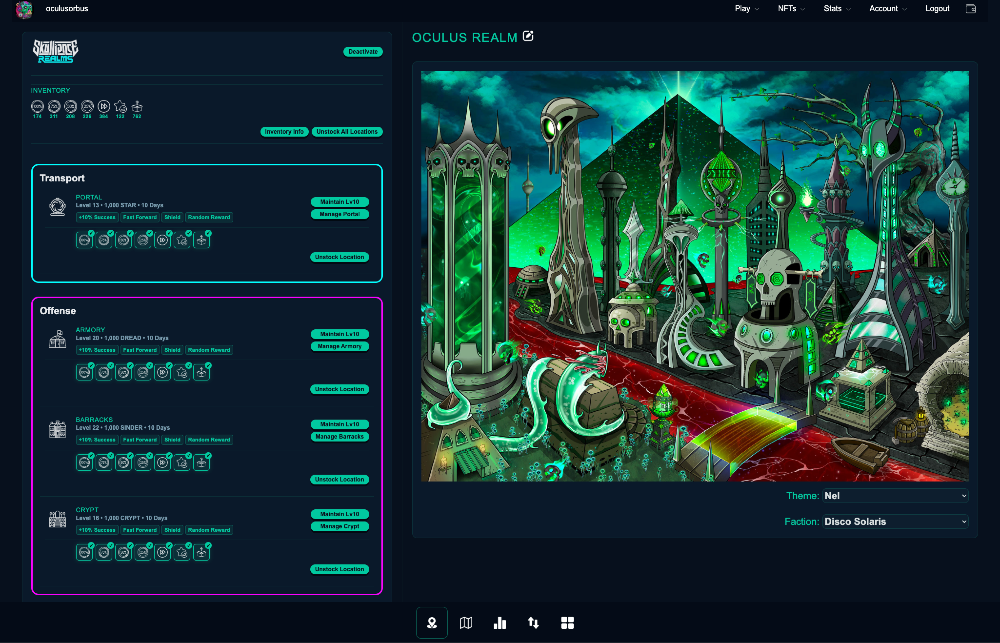
The right-hand panel is your realm's own: its name, its artwork, and the two settings that define it.
- Theme is the artwork. Any project you hold at least one NFT from.
- Faction is who you raid alongside. Same requirement.
Changing either no longer reloads the page. It used to submit a form, which meant re-running every priced location, the map, the raid lists and your soldier roster just to change one picture - and if you picked something you do not hold an NFT for, the refusal arrived as a pop-up over the reloaded page. Now it saves in place and tells you inline, and a refused change puts the dropdown back where it was rather than leaving it showing something you did not get.
Deactivate has moved to the bottom of the locations panel, on its own. It was next to the Guide button, which on a phone put it directly under the fixed menu button. It still asks for confirmation.
Getting around the page
Realms shows one section at a time, and the strip of links across the top of the page is how you move between them. The two you act in come first - Locations and Attack - then Raids, then Realm, then the Map, which is there to look at rather than to do anything in. It stays pinned to the top as you scroll, so the rest of the page is always one press away no matter how far down a long locations list you are.
On a wide screen your realm panel rides alongside the locations rather than being its own destination, so its link is dropped there. Everything else is on the strip at every width, the map included. It used to be hidden below 768px, because the map laid itself out to the width of your screen and on a phone that turned it into a single column twelve screens deep. It is composed at a fixed size now and scaled to fit, so you get the whole map on one screen - territories, factions and every realm marker - and you pinch to zoom in or tap a marker for the full detail.
This replaced a row of icons that used to sit fixed at the bottom of the screen. It is the same control the Missions page uses, in the same place.
On a phone you can also swipe. A swipe left moves to the next section, a swipe right to the previous one. It is purely a shortcut - the links do exactly the same thing - and it stands down whenever the gesture belongs to something else: a dialog being open, the menu being open, or a swipe that starts on the link strip itself, on a field, or on anything that scrolls sideways. Missions works the same way, jumping to the next section down the page.